Visualizzazione post con etichetta vmWare. Mostra tutti i post

martedì 26 gennaio 2016

Convert a Linux ESXi Virtual Machine to Xenserver

Since I had to migrate my hypervisor from vmware ESXi to Citrix Xenserver 6.5, I had to convert my Centos Linux 6.x Virtual Machines.
The main difference in Xenserver is that the Linux kernel is paravirtualized.

Tools for the trade:
- vmware vSphere Client
- Xencenter
- Very little Linux terminal skills :)

STEP 1

Optional: take a snapshot

Drop into vSphere Client and take a snapshot.

It's safe to take a snapshot before messing with vms :)
It is safe to take a snapshot prior to daamge your work

STEP 2

Uninstall vmware Tools


Connect to virtual machine console and type as root:

# rpm -e --nodeps $( rpm -qa | grep vmware-tools)


STEP 3

Export the Virtual Machine into an OVF Package.


Shutdown your VM then in VSphere Client Select your VM and click on File->Export->Export OVF Template
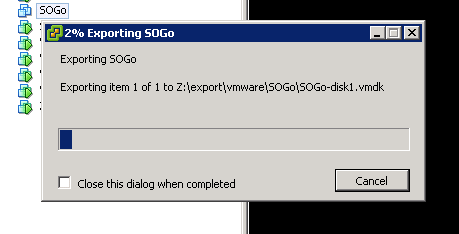
vm export
Export your VM - now you can go take some coffee

STEP 4

Import The VM in Xenserver


Now move to Xencenter, right click on the Pool then select Import...

Time to import your VM - now you can go take another coffee

Follow the instructions on wizard


STEP 5

Configure VM for PV.

Power on your VM and login to console as root.

Remove the stock kernel and install the xen-aware kernel by typing

# yum remove kernel
# yum install kernel-xen


Edit the bootloader, add to "kernel=" line

console=hvc0


Then shutdown your VM.

Now open a console to your Xenserver host and change boot policy from HVM to PV:

xe vm-list name-label=[NAME-OF-YOUR-VM]
uuid ( RO)           : [UUID-OF-YOUR_VM]
     name-label ( RW): SOGo
    power-state ( RO): halted

xe vm-param-set uuid=[UUID-OF-YOUR_VM] HVM-boot-policy="" PV-bootloader=pygrub PV-args="graphical utf-8"

xe vm-disk-list uuid=[UUID-OF-YOUR_VM]
Disk 0 VBD:
uuid ( RO)             : [UUID-OF-VBD]
    vm-name-label ( RO): SOGo
       userdevice ( RW): 0
[...]

xe vbd-param-set uuid=[UUID-OF-VBD] bootable=true

Then Power on your VM and Install XenTools.

Source: CTX121875

giovedì 14 marzo 2013

SCST ocf Resource Agent Updated: SRPT (Infiniband) support

It's time to update the SCST Pacemaker Resource Agents!


This release introduces some new features.

Infiniband support is added. Now is possible to add infiniband target and map LUNs to it. It is also possible to have, in the same resource a LUN mapped both to iSCSI and to Infiniband. ESXi is reported to behave fine with this setup.

Tests are welcome and appreciated.

Resource Agents can be downloaded from my Dropbox: https://dl.dropbox.com/u/3102209/Projects/SCST-ocf/SCST-ocf-1.2.tar.gz


Below is part of README file:


EXAMPLE OF USAGE

Assumptions:
- you are using DRBD as backing device (/dev/drbd1)
- your target iqn is iqn.2012-02.com.mysuperhasan:vdisk.lun
- your nic reserved for iscsi is eth2 and your iscsi subnet is 192.168.103.x

This is what your resource configuration in cib notation will look like:


primitive DRBD_VOLUME ocf:linbit:drbd \
    params drbd_resource="DRBDRESOURCE" \
    op monitor interval="29" role="Master" \
    op monitor interval="31" role="Slave"
primitive ISCSI_IP ocf:heartbeat:IPaddr2 \
    params ip="192.168.103.20" cidr_netmask="24" nic="eth2" \
    op monitor interval="10s"
primitive ISCSI_LUN ocf:scst:SCSTLun \
    params iscsi_enable="1" target_iqn="iqn.2012-02.com.mysuperhasan:vdisk.lun" iscsi_lun="0" \
    path="/dev/drbd1" handler="vdisk_fileio" device_name="VDISK-LUN10" \        
    additional_parameters="nv_cache=1" \
    op monitor interval="10s" timeout="120s"
primitive ISCSI_TGT ocf:scst:SCSTTarget \
    params iscsi_enable="1" iqn="iqn.2012-02.com.mysuperhasan:vdisk.lun" \
    portals="192.168.103.20" \
    op monitor interval="10s" timeout="120s"
group GR_ISCSI ISCSI_TGT ISCSI_LUN ISCSI_IP
ms MS_DRBD_VOLUME DRBD_VOLUME \
    meta master-max="1" master-node-max="1" clone-max="2" \
    clone-node-max="1" notify="true"
colocation CO_ISCSI_ON_DRBD_VOLUME inf: GR_ISCSI MS_DRBD_VOLUME:Master
order OR_DRBD_BEFORE_ISCSI inf: MS_DRBD_VOLUME:promote GR_ISCSI:start


INFINIBAND:
For now infiniband support is using one target per HCA model, with SCST auto-created target names.
Soon it will be ported in one target per per mode, with target names represented by HCA port GUID

The CIB for infiniband looks like this:

primitive ISCSI_LUN ocf:scst:SCSTLun \
    params target_iqn="iqn.2012-02.com.mysuperhasan:vdisk.lun" lun="0" \
    path="/dev/drbd1" handler="vdisk_fileio" device_name="VDISK-LUN10" \        
    srpt_enable=1 additional_parameters="nv_cache=1" \
    op monitor interval="10s" timeout="120s"
primitive ISCSI_TGT ocf:scst:SCSTTarget \
    params iqn="iqn.2012-02.com.mysuperhasan:vdisk.lun" \
    portals="192.168.103.20" \
    srpt_enable=1 \
    op monitor interval="10s" timeout="120s"


venerdì 16 marzo 2012

SCST iSCSI Resource agents for pacemaker.


Inspired by Openfiler I built my own DIY Highly Available SAN using Pacemaker, DRBD, LVM and SCST.
 
My current setup is:
- Two servers running gentoo
- a DRBD device in single primary
- a floating IP address
- an iSCSI Target with one LUN pointing straight to the DRBD device (vdisk_fileio, nv_cache).

The cib looks like:

node isan01 \
    attributes standby="off"
node isan02 \
    attributes standby="off"
primitive DRBD_VG1 ocf:linbit:drbd \
    params drbd_resource="ISCSIVG1" \
    op monitor interval="29" role="Master" \
    op monitor interval="31" role="Slave"
primitive ISCSI_IP1 ocf:heartbeat:IPaddr2 \
    params ip="192.168.100.20" \
    op monitor interval="10s"
primitive ISCSI_LUN_LUN10 ocf:scst:SCSTLun \
    params target_iqn="iqn.2012-02.com.

isan:vdisk.lun10" lun="0" path="/dev/drbd/by-res/DRBD_VG1" handler="vdisk_fileio" device_name="VDISK-LUN10" additional_parameters="nv_cache=1" \
    op monitor interval="10s"
primitive ISCSI_TGT_LUN10 ocf:scst:SCSTTarget \
    params iqn="iqn.2012-02.com.isan:vdisk.lun10" portals="192.168.100.20" \
    op monitor interval="10s" timeout="60s"
group GR_ISCSIVG1 ISCSI_TGT_LUN10 ISCSI_LUN_LUN10 ISCSI_IP1
ms MS_DRBD_VG1 DRBD_VG1 \
    meta master-max="1" master-node-max="1" clone-max="2" clone-node-max="1" notify="true"
colocation CO_ISCSI_ON_DRBD_VG1 inf: GR_ISCSIVG1 MS_DRBD_VG1:Master 
order OR_TARGET_BEFORE_VG1 inf: CL_ISCSI_TGT_LUN1:start GR_ISCSIVG1:start
order OR_DRBD_BEFORE_VG1 inf: MS_DRBD_VG1:promote GR_ISCSIVG1:start
property $id="cib-bootstrap-options" \
    dc-version="1.0.9-da7075976b5ff0bee71074385f8fd02f296ec8a3" \
    cluster-infrastructure="openais" \
    expected-quorum-votes="2" \
    stonith-enabled="false" \
    no-quorum-policy="ignore" \
    default-action-timeout="240"
rsc_defaults $id="rsc-options" \
    resource-stickiness="200"


Now I'm testing it  using vmware ESXi 5 as initiator. Seems working.

You can download them from my Github account ...

... and put them in /usr/lib/ocf/resource.d/scst.

UPDATE

SCST resource agent are now included in head revision of SCST project.
I'm just finished writing a master/slave version of SCSTLun, suitable only for iSCSI vdisk.
In the next days I'll test it and soon publish a little howto :)

venerdì 9 marzo 2012

Esportare le unità a nastro via iSCSI con SCST, autoloader compresi!

Nelle moderne sale server ci piace virtualizzare tutto. A volte anche il server che gestisce i backup. Quando facciamo backup su disco è facile, basta un NAS, ma quando dobbiamo farlo su nastro?
Va bene che vmware supporta il pass-through dei dispositivi SCSI, ma dato che ho un paio di storage iSCSI realizzati con Linux, perché non usarli anche per rendere disponibili nastri e autoloader, oltre che ai dischi?

Vediamo come farlo con linux, il target generico SCST e una unità Dell Powervault 124T.

( Do per scontato che abbiate già un'installazione linux con SCST funzionante, altrimenti in rete ci sono diversi howto da seguire per arrivare allo scopo. )

Per prima cosa colleghiamo e accendiamo la nostra libreria, se è esterna.
Poi controlliamo che il sistema la rilevi correttamente, con il comando lsscsi:

brick01# lsscsi 
[1:0:0:0] cd/dvd PLDS DVD+-RW DS-8W2S 1D11 /dev/sr0
[2:0:0:0] disk Generic STORAGE DEVICE 0207 /dev/sda
[3:0:32:0] enclosu DP BACKPLANE 1.05 -
[3:2:0:0] disk DELL PERC 6/i 1.21 /dev/sdb
[4:0:0:0] tape IBM ULTRIUM-TD4 97F0 -


Le librerie normalmente sono costituite da due LUN, la LUN0 che punta al nastro e la LUN1 che punta al media changer. Nel mio caso quindi (e probabilmente anche nel vostro) manca qualcosa ...

Dal momento che lo SCSI ID dell'unità a nastro è 4:0:0:0, rappresentato nella forma H:C:I:L (Host:Channel-ID-Lun), il nostro media changer dovrebbe corrispondere allo SCSI ID 4:0:0:1.
Per cui diciamo al sottosistema SCSI di linux di andare a interrogare anche l'ID del media changer.

brick01#echo "scsi add-single-device 4:0:0:1" > /proc/scsi/scsi

Ora l'unità dovrebbe fare un po' di rumori. Almeno è quello che ha fatto la mia!
Verifichiamo con lsscsi che il comando sia andato a buon fine:

brick01# lsscsi
[1:0:0:0] cd/dvd PLDS DVD+-RW DS-8W2S 1D11 /dev/sr0
[2:0:0:0] disk Generic STORAGE DEVICE 0207 /dev/sda
[3:0:32:0] enclosu DP BACKPLANE 1.05 -
[3:2:0:0] disk DELL PERC 6/i 1.21 /dev/sdb
[4:0:0:0] tape IBM ULTRIUM-TD4 97F0 -
[4:0:0:1] mediumx DELL PV-124T 0075 -


Ed ecco il apparire il changer!

Ora possiamo procedere con la configurazione di SCST.
Attiviamo prima gli handler di nastro e changer:

brick01#modprobe scst_tape
brick01#modprobe scst_changer


Per chi usa scstadmin, creiamo i due device in pass-through, creiamo un target iscsi e abilitiamolo:


brick01# scstadmin -open_dev 4:0:0:0 -handler dev_tape_perf
brick01# scstadmin -open_dev 4:0:0:1 -handler dev_changer
brick01# scstadmin -add_target iqn.2012-03.com.brick:vsan.tape -driver iscsi
brick01# scstadmin -add_lun 0 -target iqn.2012-03.com.brick:vsan.tape -device 4:0:0:0 -driver iscsi
brick01# scstadmin -add_lun 1 -target iqn.2012-03.com.brick:vsan.tape -device 4:0:0:1 -driver iscsi
brick01# scstadmin -enable_target iqn.2012-03.com.brick:vsan.tape -driver iscsi


Per chi vuole agire direttamente sul file di configurazione, invece:

#File /etc/scst.conf

HANDLER dev_changer {
        DEVICE 4:0:0:1
}

HANDLER dev_tape_perf {
        DEVICE 4:0:0:0
}

TARGET_DRIVER iscsi {
        enabled 1

        TARGET iqn.2012-03.com.brick:vsan.tape {
                enabled 1
                rel_tgt_id 1

                LUN 0 4:0:0:0
                LUN 1 4:0:0:1
        }
}


Poi andate sul vostro initiator preferito (io ho testato il tutto con Microsoft iSCSI Initiator e Symantec Backup Exec), collegate il target, e buon backup!